Trial Access
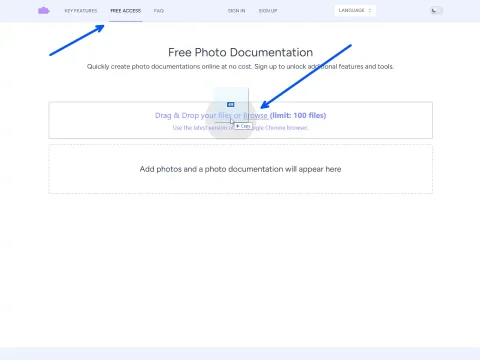
Quickly try creating a photo report without registration
$0 /download
- 1 free photo report
- up to 100 images in one report
- PDF and Word export
- no report history saving
A full-cycle photo documentation service: capture on site, turn photos into a report or inspection document, and print the finished result as Word or PDF.
Document construction progress, site conditions, and completed work. Create visual records for contracts, handovers, and quality assurance that serve as legal proof of work.
Document damage, losses, and property conditions with timestamped, annotated photos. Provide clear visual evidence to support claims and streamline the verification process for adjusters and insurers.
Conduct thorough property, compliance, and delivery inspections. Generate standardized reports with photos and notes to document findings, note defects, and manage follow-up actions.
Upload photos directly from your computer or mobile device into the browser.
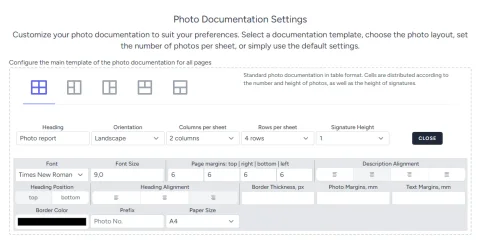
Configure your report layout as a standard table, a photo column, or with captions positioned to your preference.
Select portrait or landscape page orientation. The system automatically calculates optimal image dimensions.
Include a report title on every page or only on the first page.
Define how many photos appear on each page. The system calculates the optimal size and placement.
Control the space for image descriptions by setting the number of text lines or the percentage of space allocated.
Apply unique layout settings to individual pages within the same report for maximum flexibility.
Reorder entire pages or individual images within your report using simple drag-and-drop.
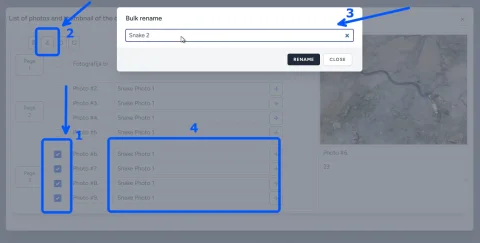
Select multiple photos to rename, delete, or rotate them simultaneously, saving valuable time.
Number all photos sequentially with one click. Apply a custom prefix or choose not to use numbering.
Use predefined text templates for frequent descriptions to maintain consistency and avoid manual typing.
Add annotations, arrows, and text directly onto images to highlight key details and provide clear instructions.
Invite team members to collaborate on photo documentation, ensuring everyone works from a single source of truth.
Automatically organize photos by project, date, or custom tags. Eliminate chaotic folders and save hours previously spent manually sorting images.
Create timestamped, annotated visual records that provide unambiguous proof of conditions, progress, or damage for contracts and claims.
Access, edit, and share your photo documentation from any device with a browser. All data is securely stored in the cloud and instantly synchronized.
Frequently Asked Questions about Photo Reports and Documentation
Create professional photo reports online in minutes. Flexible plans, automatic Word generation, templates, photo captions, and handling large image volumes.
Quickly try creating a photo report without registration
Create photo reports in your personal account for free
20 US cents per download
15 US cents per download with a large top-up